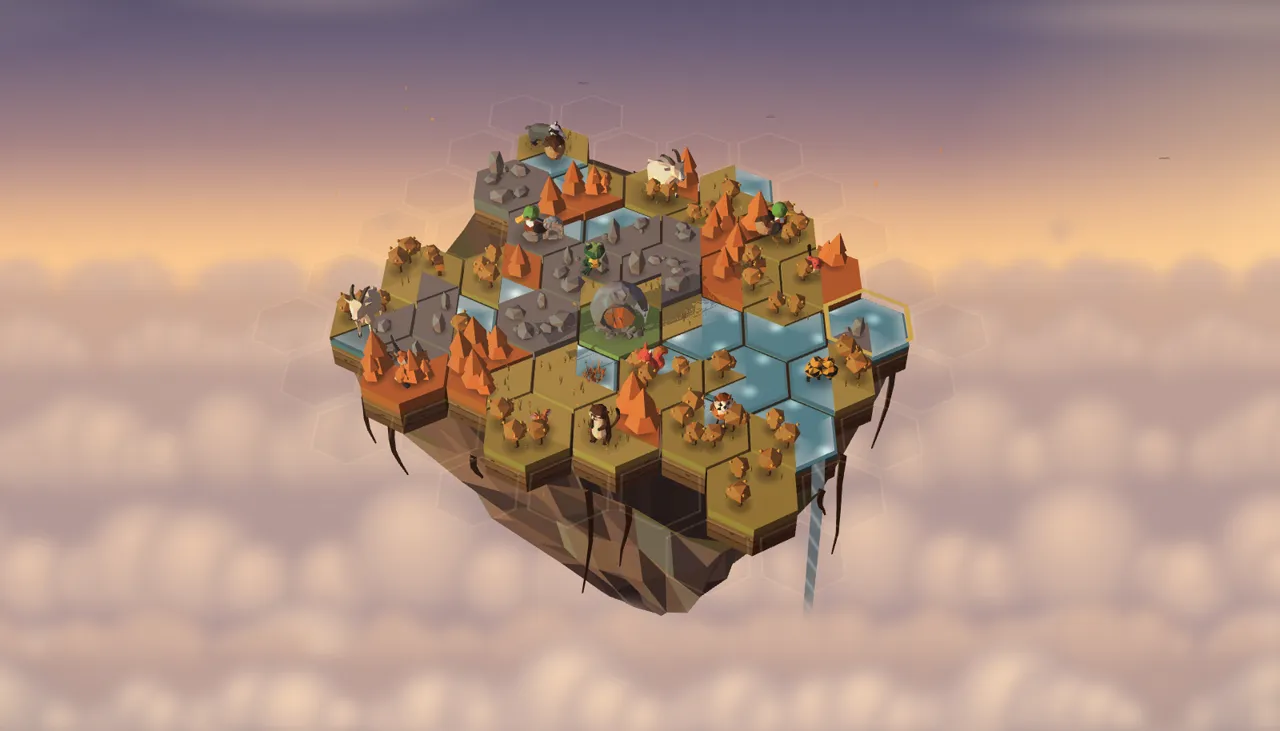
About Cloudburrow
Cloudburrow is a cozy tile-placement puzzle set on a tiny island floating in a dusk sky, rendered as a 3D diorama you can turn and zoom. You grow the island one hex tile at a time, matching the edges of meadow, grove, pond, orchard and crag, and every patch of terrain you close off becomes a habitat. Critters write you letters asking for exactly the home they want, a hedgehog asking for a closed grove with a hollow log or a pair of ducks asking for a pond of four, and when you build it they arrive and potter about the island for the rest of the run. Residents are also how the island feeds itself: at each season turn the ones in season bring you new tiles, so a kind keeper plays longer. The seasons change everything, from the island's colours to which terrains score double and which critters write. Mismatched edges are always allowed, so there is no fail state, only a calmer or a cleverer island. Each week the Event Island gives everyone the same seeded island under one rule twist, such as a Rainy Week where ponds score double, with three scored tries, a weekly leaderboard and a spoiler-free share card. The Endless island keeps growing to 217 hexes, and the Field Journal collects every species you have welcomed across every run. Cloudburrow is free, runs in the browser with no download, and supports keyboard play, reduced motion and colour-independent edge marks.
How to Play Cloudburrow
Each turn you hold one hex tile whose six sides are meadow, grove, pond, orchard or crag. Tap a glowing slot on the island's edge to hover the tile there, tap it again (or swipe across it) to turn it, then press the Plant stamp or press and hold the tile to set it down. Every side that meets a neighbour of the same terrain scores, and a tile whose touching sides all match is Snug and earns a dewdrop. When a patch of one terrain is closed off on every side it becomes a habitat, and if it matches one of the three critter letters pinned to your board, that critter moves in and lives on your island. Every fifteen tiles the season turns: the island changes colour, residents in season bring you new tiles, and new letters arrive. The Event Island is the same island for everyone all week, lasts one year of four seasons and gives you three scored tries; the Endless island runs until your satchel is empty or the island is full. On a keyboard, the arrow keys with Q and E move a cursor, Tab jumps between free slots, R turns, Enter or Space plants, B swaps with the Basket, L jumps to the letters, F6 steps between the island and the HUD, J opens the Field Journal and Esc pauses.
Cloudburrow Tips and Strategy
- Close regions inward. A patch of terrain that touches the island's rim stays open for good, so build each meadow, grove or pond toward the middle and finish it off with tiles whose other sides face away.
- Read the ghost before you plant. Its tag shows how many edges match, what it would close and which letter it would answer, and the solid or dashed marks on its sides show every match and clash.
- Snug placements pay twice: at least two neighbours with every touching edge matching earns points and a dewdrop, and three dewdrops condense into a fresh tile for your satchel.
- Residents are your supply. At every season turn each critter whose season it is brings you a seed tile, so answering letters early is what keeps a long run going.
- Use the Basket. It holds one tile, swapping is free, and parking an awkward tile until the right gap opens up is often worth more than forcing it now.
- Habitats score more in their own season: meadow in spring, pond and orchard in summer, grove in autumn and crag in winter. Holding a nearly closed grove for autumn can double it.
- A letter is never lost. If a new letter asks for a habitat you have already closed, the critter moves straight in, so building generous habitats pays off later too.
Cloudburrow FAQ
Is Cloudburrow free to play?
Yes. Cloudburrow is free on Weekly Arcade, with no download, no ads and no purchases. It runs in any modern browser on a phone, tablet or computer.
How do I place and turn a tile?
Tap a glowing slot on the island's edge to hover your tile there. Tap the hovering tile again, or swipe across it, to turn it one side. To plant it, press the Plant stamp or press and hold the tile for a moment. With a mouse you can also turn it with the wheel and plant it with a right-click.
What is a habitat?
A habitat is a connected patch of one terrain that is closed on every side, with no edge left open to an empty slot or the island's rim. Closing one scores it, and any habitat of two or more tiles can house critters.
How do critters move in?
Three letters are pinned at a time, each from a species asking for a home: a terrain, a size, and sometimes a nook such as a hollow log or a beehive, a neighbouring terrain or a season. When you close a habitat that fits a letter, that critter moves in. If a new letter fits a habitat you closed earlier, it moves in straight away.
What happens when the season turns?
Every fifteen tiles the season changes. The island recolours, residents whose season it is bring you new tiles, every resident earns thrive points, and letters from out-of-season critters fly away and are replaced. Each terrain is worth double when you close it in its own season.
How does the weekly Event Island work?
From Monday to Sunday (UTC) everyone gets the same island and the same tiles, with one rule twist for the week: a Rainy Week where ponds score double, a Bumper Satchel with six extra tiles but cheaper edges, Heavy Dew that condenses tiles faster, or a Critter Fair where critters pay more. An Event run lasts one year, four seasons of fifteen tiles, and any tiles left in your satchel at the end score as a bonus. You get three scored tries a week and your best one counts on the weekly Event leaderboard; after that you can keep playing the island as practice.
When does a run end?
A run ends when your satchel of tiles is empty. An Event Island run also ends after its sixtieth tile, at the close of the year, and the Endless island ends in Full Bloom when all 217 hexes are filled.
Can I play Cloudburrow with a keyboard?
Yes. The arrow keys with Q and E move a six-way cursor, Tab and Shift+Tab jump between free slots, R turns the tile, Enter or Space plants it, B swaps with the Basket, L jumps to the letters and F6 steps between the island and the HUD, square brackets orbit the camera, plus and minus zoom, J opens the Field Journal and Esc pauses. Every slot and preview is announced to screen readers, and matches and clashes are marked by shape as well as colour.